WEBSITE GUIDE
Appointment request vs. online booking: what does your website need?
An appointment request asks your business to check a job and agree on a time. Online booking lets a customer choose an available slot under rules you have already set. Choose the process your team can reliably manage before choosing the button on your website.
What happens after an appointment request?
A visitor describes the service they need and leaves contact details. Your team checks the work, location and availability, then replies with an agreed time. The form's success message confirms that the request was received. It should not tell someone that an appointment is confirmed before you have accepted it.
This suits jobs whose duration or price depends on details you need to review. A detailing business might need the vehicle size, chosen service and condition of the interior. A cleaning business may need to check the size of the property and the requested work before agreeing to a visit.
Request an appointment
Tell us which service you need and how we can reach you.
We will contact you to agree on the details and an available time.
Your visit is confirmed only after we reply.
What makes online booking different?
A booking system displays times that customers can reserve. It needs service durations, staff availability and rules for gaps between appointments. If a provider requires your approval, the website must explain that the selected time is still a request.
For example, Google Calendar appointment schedules let you share a booking page, add booked appointments to a calendar and block unavailable times. This is a separate scheduling product. Showing a form or a date field on a business website does not create that behaviour.
If you already use a booking provider, share the actual booking link when planning your website. We can discuss how visitors should reach it and agree on that work separately. Provider fees and features depend on the service and plan you choose.
Compare the two paths
Appointment request
- Customer describes the service
- Business checks the details and availability
- Business and customer agree on the visit
Sending the form does not reserve a time.
Online booking
- Customer sees the provider's available times
- Customer selects a slot
- Provider confirms or requests approval under its rules
The provider's actual status determines whether the visit is confirmed.
On a small screen, scroll the table sideways to read every column.
| Question | Appointment request | Online booking |
|---|---|---|
| Who chooses the final time? | Your team and the customer agree after reviewing the request. | The customer chooses from the times the provider offers; approval rules may still apply. |
| What does the website need? | Useful service information, a contact route and a clear follow-up process. | A scheduling provider with maintained availability and the right service rules. |
| What should a success message say? | Request received; explain how the business will confirm the visit. | Reflect the provider's actual status: reserved, confirmed or awaiting approval. |
| When does it fit? | The job or duration needs discussion before a time can be agreed. | The services and durations are defined well enough to offer bookable slots. |
Look at the forms in our design concepts
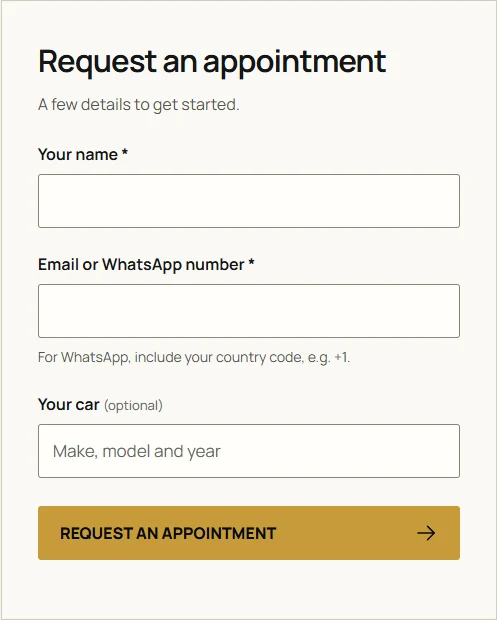
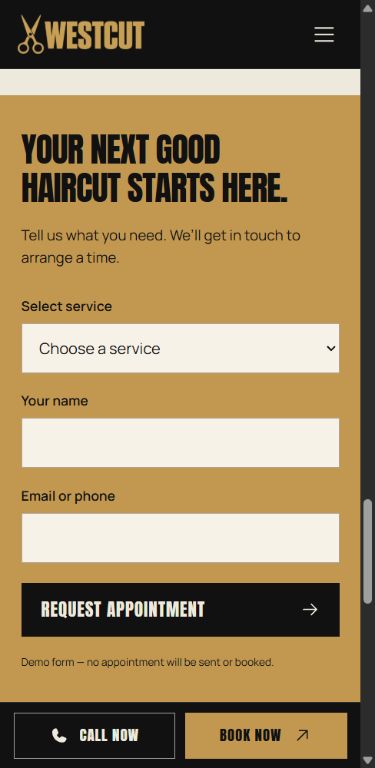
Our Detail Studio concept shows service packages, vehicle choices and an appointment request form. WESTCUT shows grooming prices, barber profiles and a request form. These are fictional design demonstrations, not operating businesses or live calendars.
Inspect the detailing request layout and the barbershop request layout. Look at what a customer needs to understand before contacting the business. Their comparable website scope is $299 each; that price does not include a scheduling platform or a live availability integration.
Ask for the information you need to reply
Keep the first request short enough to complete on a phone. Choose fields around what you need for the next decision, rather than collecting everything you could possibly ask.
- A salon might ask for the service, preferred barber, contact details and a preferred day. Label the day as a preference if it does not reserve a slot.
- A detailing service might ask for the vehicle category and package. Let someone describe unusual work before quoting it.
- A business that travels to customers should decide when it needs the location. Avoid collecting a full address before it is useful.
Agree on who receives requests and who replies. Write the follow-up message around a response time your business can actually meet. A request lost in an unattended inbox leaves the customer waiting, however good the form looks.
What belongs in your website budget?
ILDARIO's $199 one-page package uses direct contact links and has no contact form. The $299 package includes a contact form and a map for a confirmed business address, with up to six sections. The $399 package covers up to five pages, up to 30 AI-generated images, analytics and Google Search Console setup. Video production is separate.
An enquiry form is different from a scheduling integration. Agree on the fields, delivery route and any provider connection before work begins. A separate booking system and its fees are not part of the standard form package.
Domain registration and renewals are separate. Optional care costs $99 paid once for six months and includes hosting for that period, with no automatic renewal. See the full packages and payment terms or our website budget guide.
Check the whole path before launch
- Use the request or booking link on a phone and check that the labels match what it actually does.
- Send a test request through your own website and confirm that the right person receives it.
- Check required fields, errors and the success message. A preferred date must not be described as a reserved time.
- If a scheduling provider is connected, test its availability and confirmation rules as well as the link from your website.
For your first website discussion, decide which services need a conversation and which could use a defined appointment length. Leave your contact details and we can discuss the website scope around that process.
More help with planning your website
Website services for your business
Tell me what you are starting.
Share your business, the information you want to show and how customers should reach you. We will agree on the scope and a fixed price before work begins.
Discuss your website